Context #
This project is my “specialization” from TGA. It’s a personal portfolio piece developed during one of our courses. The time allotted was approximately 80h. We were free to choose any project as long as we and the teachers deemed it a reasonable scope.
When choosing, I remembered a video I’d seen before I started that has left a quite strong impression on me. It was a GDC-talk from Risto Jankkila and Sharman Jagadeesan of Housemarqe, in which they describe their fascinating VFX pipeline. In particular I was intrigued by the tentacles they use generously throughout the game, as both environment and parts of enemies. In the video it is explained how they have a very dynamic particle system that they use for different simulations, amongst other things the tentacles.
Execution #
Without any prior knowledge of generating meshes on the GPU, I set up some fundamental components that I knew had to be present, such as buffers for particles and vertices. I decided to start with the most basic approach I could think of, with the presentation as a guide.
In order to verify the particle buffers and basic logic I started out by creating chains of particles visualized by points, progressing to create triangles between the points. Then I created a tube around the particles, rotating points around the world up vector. For each pair of particles I generated triangles between their associated points.
Next up, I added some movement behaviour to the particles to give some tentacle feel to them. This also made the next problem very visible: the rotation of the tube.
Each point on a curve has its “forward” pointing in the direction of the tangent to the curve at its position. I approximated that to the direction from the previous particle in the chain to the next, which seems to work fine. Determining the point’s rotational alignment along that line is trickier, but important. If the points are not well-aligned in rotation around the curve, they will twist the vertices relative to one another and thus deform the triangles. The solution was to start from the rotation of the base of the tube and align every particle with the parent’s orientation.
This yielded a right vector I could rotate around the forward to determine the vertex positions.
I noticed that the shader ran a little slow, taking about 7ms to solve 15k tentacles and ~3M triangles on the 2080 I tested on, so it was time for optimization.
Previously I had naively generated each band of triangles separately, but since each band reuses half of the vertices from the previous, I could easily cache that, which improved the performance a little, to roughly 5-6ms. Then I tried, at the suggestion of my teacher, to “remove” a loop I had to evaluate the triangles of the segment. The way I solved that was by turning the rotational triangle resolution constant and unrolling the loop which brought the total time down to 3ms, a significant improvement. I was still not happy, however. What I assumed were the biggest issues remaining were that I had to calculate the vertices for two particles for each loop of triangles, as well as the seemingly unnecessary process of writing each vertex 6 times to the triangle buffer, one for each triangle they’re a part of. Both of these issues can be solved using an index buffer. I could also clean up the code a considerable amount since the shader calculates a single particle and one loop of vertices corresponding to it. The index buffer only has to be calculated once since it’s static most of the time, so it could be excluded from the shader entirely. With these changes the time was down to below 1ms, with margin.
Breakdown #
Setup #
Fundamentally, there are 4 buffers in play. Two for the particles, one for the vertices and one for the indices. The particles are updated on the GPU and the vertices generated in the same step. The reason for two particle buffers is that one is read-only representing the previous frame’s data in order to avoid syncing millions of reads from the same buffer that is being written to. As mentioned in the GDC talk, this introduces a lag between each particle and the parent, which can be used as smoothing over time. It does come with complications, however, especially with fast movement, long dependency chains and variable frame rates. More on that later.
Movement #
The particles follow a combination of basic behaviours that are applied to the particles’ velocities with adjustable weights. These behaviours are:
- Wriggle: a simple sin-wave to generate tentacle-esque movement.
- Straighten: a uniform force along the tentacle according to the orientation of the base.
- Stiffen: a force according to the orientation of the parent in order to reduce the amount of bend at each joint.
- Gravity: a uniform force downwards
- Look-at-camera: a uniform force towards the camera
The goal with these behaviours was mainly to demonstrate the flexibility that comes with blending behaviours and the capability of adjusting them both interactively and programmatically.
Mesh #
Now that the positioning of the particles is out of the way, we can move on to the orientation. Each particle is logically oriented somewhere “in-between” the parent and the child, but how do we find that orientation? What I decided to be the “forward” in this situation, the direction along the curve, is straightforward enough: the direction from the parent of the node to the child. The “right” direction is trickier since it requires an optimal rotational alignment along the length of the shape to avoid twisting the vertices and thus deforming the triangles.
float3 normal = child.position - parent.position;
float3 n = normalize(normal);
float3 right =
    normalize(parent.right - n * (dot(parent.right, n) / dot(n,n)));
If we rotate a vector around the forward vector we get a ring of points around each particle, or “joint.” This serves perfectly as positions for the vertices. Using the right vector as the starting point, we ensure that all the points will be aligned.
void submit_ring_v(uint particleId, float r, float scale, float percentage)
{
    const Particle particle = rwPreviousParticleBuffer[particleId];

    const uint startVertex = particleId * verticesPerRing;
    const float3 offset = particle.right * r;
    const float vertexAngle = 2 * TAU / info.triangles_per_segment;

    float ringRadius = r * max(scale, FLT_EPSILON);
    const float invRadius = 1.f / ringRadius;
    const float invCircumference = 1.f / (r * TAU);

    [unroll]
    for(uint i = 0; i < verticesPerRing; ++i)
    {
        const float angleNext = Timings.x + vertexAngle*(i + 1);
        const float4 rotator = create_angle_axis(particle.normal.xyz, angleNext);
        const float3 rotated = rotate_vector(offset, rotator);

        vertex v;
        v.position = (rotated + particle.position);
        v.normal = (v.position - particle.position) * invRadius;
        v.binormal = particle.right;
        v.uv = float2(float(i)/verticesPerRing, percentage * invCircumference);
        v.padding = 0;

        rwVertexBuffer[startVertex+i] = v;
    }
}
For the indices, it helps visualising the vertices. For every ring, we have 5 vertices. For every ring, we offset the count by 5*n, where n is the index of the current particle. Now all we have to do is construct triangles and find a pattern in the data.
// verts of the first particle
0 1 2 3 4
// verts of the second particle
5 6 7 8 9
...
This is one way to construct the quads, with permutations. I settled on this because it starts off at 0 and has a nice symmetry. Note that the two middle columns are mirrored.
// Triangle 1 | Triangle 2
     015          516
     126          627
     237          738
     348          849
     409          905
Looking at the left column, the indices are simply counting up from 0. The next column and its mirror are simply one higher than that. The middle columns are offset by a whole circle of vertices, and the last column one more than that.
void submit_ring_i(uint particleId)
{
    particleId -= 1;
    const uint segmentId = (particleId - particleId / info.particles_per_emitter);
    const uint startIndex = info.vertices_per_segment * segmentId;
    const uint startVertex = particleId * verticesPerRing;


    [unroll]
    for(uint i = 0; i < verticesPerRing; ++i)
    {
        // for every vertex, there is 2 triangles
        const uint offset = startIndex + i * 6;
        rwIndexBuffer[offset + 0] = startVertex + ( 0 + i) % verticesPerRing;
        rwIndexBuffer[offset + 1] = startVertex + ( 1 + i) % verticesPerRing;
        rwIndexBuffer[offset + 2] = startVertex + ( 0 + i) % verticesPerRing + verticesPerRing;
        rwIndexBuffer[offset + 3] = startVertex + ( 0 + i) % verticesPerRing + verticesPerRing;
        rwIndexBuffer[offset + 4] = startVertex + ( 1 + i) % verticesPerRing;
        rwIndexBuffer[offset + 5] = startVertex + ( 1 + i) % verticesPerRing + verticesPerRing;
    }
}
Following entities #
I upload delta position and rotation for each group of tentacles every frame, then translate and rotate the base of each tentacle in the shader.
For demonstration purposes, I made a simple system to showcase the runtime capabilities. It changes some parameters for all the tentacles based on a global state. I made 3 states: idling, preparing, and jumping. In idle, the tentacles pulsate and waver, in preparing they pulsate faster and brighter as well as straightening out, and in jumping they calm down.
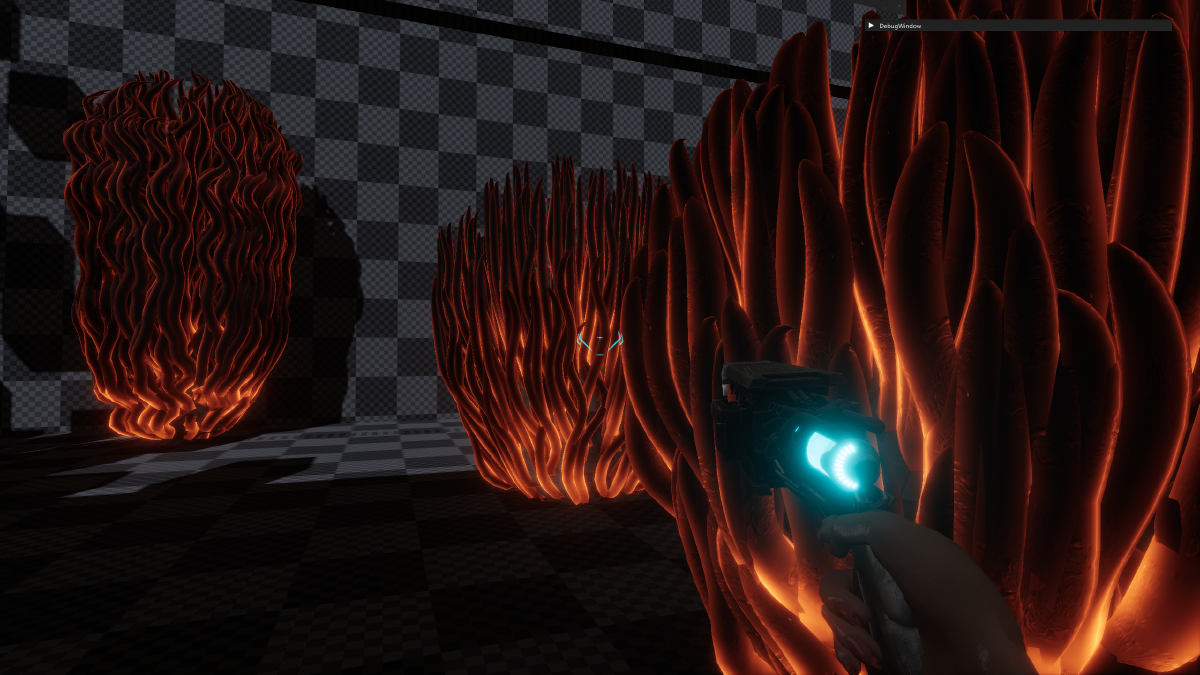
Final product #
Evaluation #
I would have liked to make a more realistic physics model for the simulation. Currently they behave as if they were dispensed in viscous fluid, without proper perseverance of momentum. It looks believable enough for most applications, but it breaks down a little when they’re rotating around a point or the attachment point moves fast, especially with long chains.